Lead the adventure
Control the board, miniatures, encounters and atmosphere. Use Builder Override when the story calls for a change during play.
 HAMMER FOUNDRY
THE NEXT CHAPTER OF GAME NIGHT
Build the place you’ve imagined. Become the hero you’ve created. Gather your party around a tabletop that comes to life in VR.
01 / MAKE YOURSELF AT HOME
Before the first die hits the table, you’re already somewhere else. Settle into a room that fits the adventure.
Heavy timber, candlelight and a crackling fireplace. The familiar comfort of a fantasy tavern, with your next world waiting on the table.
02 / THE HEART OF HAMMER FOUNDRY
The best adventures leave room for the unexpected.
Free play gives your group the table and gives the Game Master the freedom to run it. Set the scene, place the enemies, improvise an encounter and let the players surprise you.
See what you can build →A place at the table for the storyteller.
Control the board, miniatures, encounters and atmosphere. Use Builder Override when the story calls for a change during play.
Invite a player to assist with props, miniatures, lighting and effects. The host retains map generation and can revoke building privileges.
Bring reference images into movable floating frames. A dedicated GM screen anchors your place at the table.
Place up to three private PDF readers, flip or jump to pages, and search documents from your local REFERENCES folder.
CHOOSE HOW THE STORY PLAYS
A flexible sandbox for player-made scenarios, house rules and Game Master-led stories. Build your own encounter and decide what happens next.
TACTICAL SQUAD / SKIRMISH
Industrial Crossing: a 6 × 4 foot battlefield built around a shattered overpass. Marines deploy around a pipe-generator supply yard and rocky ridge; orcs muster beside the eastern refinery and ruins. A broad contested centre separates the forces, with room for vehicle movement and a southern bike flank.
Cover with a purpose. Container stacks shelter the marine supply yard. Ruined factory walls and a broken overpass divide the centre into firing lanes, while rubble and half-walls give the advancing infantry successive positions.
High ground. A narrow crossing. Sculpted ridgelines overlook winding dirt and gravel routes. A recessed, rock-lined pond constrains the northern approach; the southern route gives the orc bike a flanking lane.
MEASURE THE NEXT MOVE
The game’s measuring tape is pulled out and locked at 10″ beside a marine, illustrating a movement measurement. The displayed distance is measured in board inches.
Actual game assets and terrain tools, composed in an isolated Unity preview. A staged demonstration of Tactical Squad / Skirmish presentation.
03 / THE ORIGINAL SCI-FI CAMPAIGN
CAMPAIGN 01Five marines.
One damaged ship. A frontier gone silent.
Humanity’s outposts are falling silent. The UNS Valiant is crippled. Lead Vanguard Squad through a six-mission campaign against the Veilborn—from the dark corridors of a derelict ship to a desperate fleet engagement and the arrival of the Harvester.
MEET VANGUARD SQUAD
Hear each marine’s Mission 5 selection dialogue.
Audio plays only when you press a portrait.
Select a portrait to hear their voice.
Command all five marines in single player, or assign squad members across your group. Check health, actions, abilities and inventory on the character sheet, choose your next marine, and roll the dice to resolve the attack.
SIX CHAPTERS OF THE CONFLICT
Select a mission to inspect its poster and objective.
Take command of a tactical squadron. Break the fighter screen, disable the targeting relays, expose the cruiser array and protect the landing transports.
Campaign mission artworkMISSION 06 / THE HARVESTER ARRIVES
A shattered city beneath an immense war-form. Infantry, anchoring spires and the broken overpass reveal the scale of the final battlefield.
Actual Mission 6 battlefield, composed in Unity with game assets.
04 / THE WORLD IS YOURS TO MAKE
Start with a landscape, a generated dungeon, a block world or your own reference. Then make every room, every cliff and every encounter your own.
FULL FLOORS / CONNECTED WORLDS
Build a dungeon across complete stacked floors, or descend through a layered cave system. Each floor gets its own layout; stairs connect the layers into one playable map. Generate either directly in the game, without an AI service.
THE THREE-FLOOR DUNGEON
Three connected dungeon floors with rooms, passages and stair landings. Inspect a floor on its own, or reveal the whole stack.
3 FULL FLOORS64 × 40 FOOTPRINT2 STAIR CONNECTIONS
THE THREE-FLOOR CAVE
Broad rocky chambers and winding passages extend across each layer. Separate floor layouts make the descent a new place to explore.
3 FULL FLOORS64 × 40 FOOTPRINT2 STAIR CONNECTIONS
In game: Build → Generate dungeon → Full floor layers → Full table. Choose the layer count, each floor’s environment and the layout structure. These examples were generated by the game’s scripts and validated for floor connectivity.
Generate complete dungeon floors with connected rooms and passages. Explore the examples below, then finish your own layout with props and miniatures.
Generated with the game's tools. Captured in Unity.
Explore the generated examples
Connected floors, stairs, ramps, bridges and underground spaces. Inspect one floor or see the whole board.
Sculpt, dig, fill and paint. Cut into a hillside, carve a cave, or place and remove individual voxel blocks.
Board-local rain, snow, fog, day and night. Place coloured lights, dress cave edges and add ambient effects.
THE DUNGEON BUILDER
Paint floors, walls and doorways in the in-game layout console. Pick a theme, revise the plan and turn it into an editable dungeon built from the game’s catalogue.
Actual builder UI, captured in Unity. The loaded plan is shown before generation.
LOCAL BROWSER MAP CREATOR
Open the included GridDesigner in your desktop browser. Paint wood, grassland, cave, stone and metal regions, then save the layout and import it into Dungeon Hammer. It works offline.
Open Tools/GridDesigner/index.html from your game folder. Grassland uses grass floors and stone boundary walls. Browser layout files currently describe one floor; create stacked floors with the in-game generator.
Download this example layout ↗POPULATE YOUR WORLD
Find miniatures by name, role, environment and size. Place heroes, creatures and enemies on the board, then use their sheets to make them part of the adventure.
Search the object catalogue by type and theme. Move, rotate and scale decor in 3D, add lights and effects, and save the finished map for another night.
ONE WORLD. FOUR MOODS.
The same saved castle-and-boats map, captured through the game’s board-local weather system. Bring in the rain, let snow fall, or blanket the terrain and buildings in snow.
Clear · Your saved map, before the weather changes.
FROM YOUR COLLECTION TO YOUR TABLE
Load a Universal VTT as your gameboard, or reconstruct its walls and doors in 3D. Have a dungeon image instead? Extract a floor plan, review it and build a 3D starting point.
Runs locally. No AI service required.
Automatic conversion builds walls, doors and floors. Add furnishings from the catalogue afterwards.
01 / UNIVERSAL VTT
This crypt comes from the VTT in our reference folder. Its grid, wall lines and portals drive the conversion into catalogue floors, walls and doors.
A 24 × 21 map, aligned one VTT cell to one board cell. Play directly on the artwork; its printed walls are visual in this mode.
Keep the art, or build above it. The 3D result uses editable catalogue pieces and retains the artwork underneath for comparison. This example converts 216 floor cells, 68 authored wall segments and all five authored doors. No furniture is guessed.
Authored wall coordinates, portal positions and open states are retained. Floors are inferred from enclosed wall geometry, using the original source context for cropped exports. Local surface analysis estimates materials; catalogue pieces supply height. review exporter-specific LOS blockers and openings.
02 / A DUNGEON IMAGE
A separate example, using the PNG from the reference folder. Detailed contour tracing retains the round central chamber, rectangular side rooms and entrance niches. Generate the structural base, then furnish it from the catalogue.
Choose the floor. Keep the detail. Generate solid 3D tile floors, or keep the original image visible beneath the 3D walls and doors. For PNG maps, mark door positions in the review pane; VTT conversions retain the file’s authored doors.
Review the plan. Make it yours. Preserve image proportions, adjust the threshold and rotation, clean small gaps, or paint and erase cells. The converter selects installed catalogue pieces that fit the chosen theme and grid dimensions.
Both examples are actual local conversion results captured in Unity. Image-only tracing remains approximate: review its floor mask, dividers and openings. VTT metadata gives the structural converter more precise wall and portal coordinates. Furnishings are placed separately.
THREE MORE MAPS. THE SAME LOCAL CONVERTER.
Three distinct maps downloaded from a public map collection and run through the in-game Universal VTT converter. Compare each original 2D map with its actual 3D result.
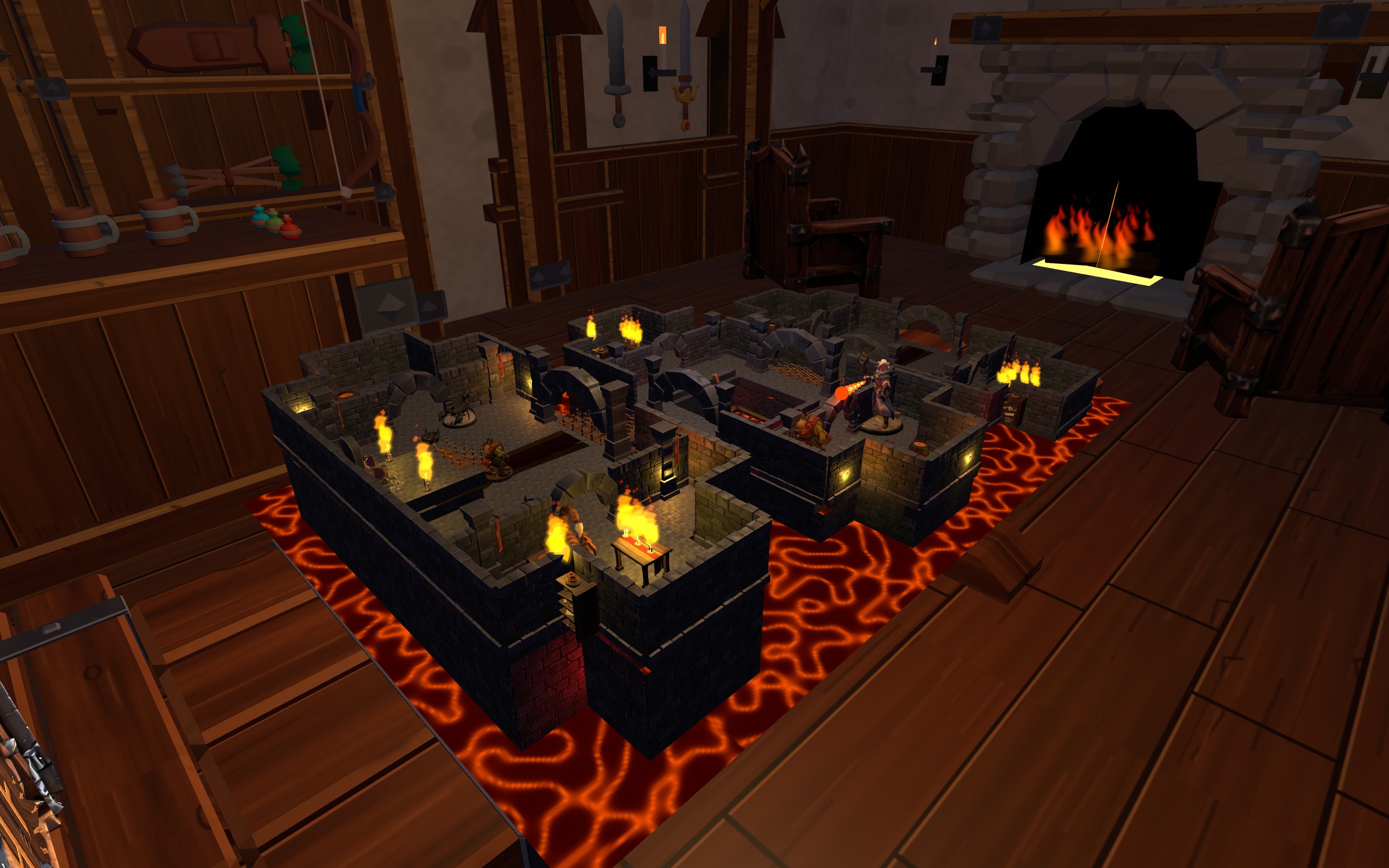
03 / DUNGEON / FIRE ROOM
The authored outline becomes a stone chamber with four passage openings. The orange lava remains part of the flat reference artwork; it is not generated 3D terrain.
04 / CAVERN-STYLE / GOLD ROOM
The source boundary is rebuilt with repeated catalogue cave-wall modules, cave earth tiles, rocks and stalagmites. Wall profiles retain their native proportions. Gold piles are not identified or reconstructed.
05 / ACADEMY INTERIOR / NORTH ROOMS
A wide interior from Stone Resolve Academy, with wooden floors beside a tiled central passage. Tables and chairs remain in the source artwork; the conversion builds the structural base.
These examples use Universal VTT wall metadata plus the embedded 2D artwork, rather than image-only tracing. Catalogue pieces approximate surface materials and height; boundary detail can differ. No furnishings are inferred. Map credits and reuse details ↗
05 / GIVE YOUR HERO A SIGNATURE
Design abilities for your heroes and enemies. Build a frost nova, a line of lightning or an explosive ranged attack—and save the recipe for another adventure.
THE ABILITY WORKSHOP
Custom abilities belong to your sandbox. The marine campaign keeps its own predefined rules and abilities.
06 / KEEP THE RITUAL. EXPAND THE POSSIBILITIES.
The reach across the board. The careful measurement. That pause before the dice settle. The little things are part of the adventure.
Pick up the dice cup, tip out the relevant dice and let them settle. Custom dice choices support the rolls your game needs.
Pull out the measuring tape, lock its length and position it in 3D. A familiar tabletop tool with room to move.
Survey the whole board, switch to a miniature’s perspective, or explore your build in first person to see its scale from the ground.
ARRIVE AS YOURSELF. OR SOMEONE ELSE.
Choose a character, shape your look and visit Bram’s Outfitter to browse armour, weapons and gear. Try items on before equipping them.
Your character is part of the shared room. Outfits and cosmetics travel with your multiplayer avatar, while your miniature tells its own story on the board.
LOOK CLOSER
Game assets, real layouts and in-game interfaces.
Select an image to see the detail.
Development imagery. Room and map photographs are composed in Unity using game assets; interface images are captured from the game. Presentation may change before release.
BEFORE YOU TAKE YOUR SEAT
Both. Play the authored Derelict Signal campaign, build and populate your own worlds, or run an open-ended tabletop session with a Game Master. The campaign and custom sandbox have separate rules and abilities.
Yes. Single player gives you control of all five marines. In a shared session, the host can assign marines to different players.
A PNG or JPG bird’s-eye reference can be used to extract a floor plan. Review and edit the detected walkable cells, then generate and customise the 3D layout. It is a guided reconstruction workflow, not a guarantee of an exact replica from any image.
Players join the host’s Steam session. The map transfers before they enter play. The host can invite a guest to build assist, giving them access to placement and adjustment tools while keeping map generation under host control.
Yes. Load PDFs from your game’s REFERENCES folder into up to three private, floating readers that you can place in 3D space. Flip through pages, jump to a specific page and search the document. These readers are local to the Dungeon Master and are not shown to other players.
Hammer Foundry is in development with PC VR beta as the first target. A public release date and Steam store link have not been announced on this page.
TAKE YOUR SEAT EARLY
Want to build worlds and help shape Hammer Foundry? Send the team a beta request. Tell us your headset and what you’re most excited to try.
YOUR NEXT GREAT STORY STARTS HERE
HAMMER FOUNDRY · PC VR · IN DEVELOPMENT